I embedded all of Qdrant's docs with FastEmbed. The API would have cost 2 cents.
5,084 chunks, 1.2 million tokens, 24 minutes on a 2 vCPU box. What running embeddings locally next to Qdrant actually costs, with every number labeled.
If you're building search on top of Qdrant, you hit this question early: do you embed your documents on your own machine, or pay OpenAI to do it?
Running it locally sounds like the thrifty choice. No API key, no per-token bill, and FastEmbed makes it a few lines of Python. The first version of my benchmark, local-inference-bench, said the API was cheaper anyway. But it only ran on 38 chunks. That shows the script works. It doesn't show much about cost.
So I pointed the same code at something bigger that anyone can download: Qdrant's own documentation and blog. 5,084 chunks, about 1.2 million tokens.
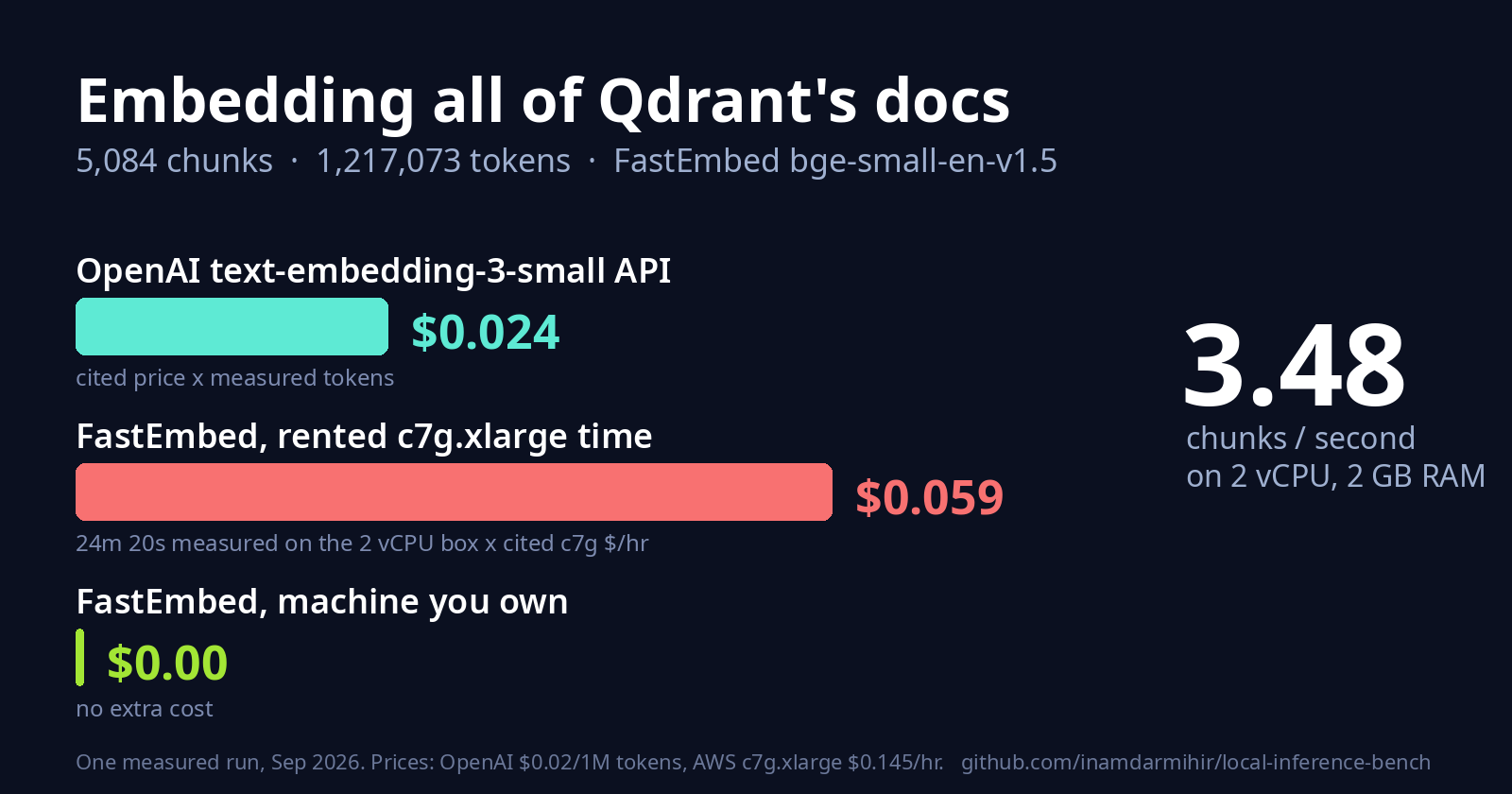
Here's what came back. FastEmbed got through all of it on a small 2 vCPU (virtual CPU) Linux box in 24 minutes 20 seconds, about 3.48 chunks a second. Sending those same 1,217,073 tokens to OpenAI's text-embedding-3-small would cost about 2.4 cents. Renting those 24 minutes on an AWS c7g.xlarge would cost about 5.9 cents.
So the API is cheaper than renting a CPU to do the same job. And, as it turned out, the local model didn't even read all of the text. More on that below.
What's actually measured here
Some of these numbers come from a real run and some come from a price list. I think the difference matters, so every number in this post has one of three labels:
Measured: FastEmbed runs
BAAI/bge-small-en-v1.5on the CPU over a folder of markdown, and the script times it.Cited: the API side uses OpenAI's published price for
text-embedding-3-small, $0.02 per 1M tokens. I never called the API. Tokens are counted with tiktoken'scl100k_base, the tokenizer OpenAI uses for that model.Projected: the measured rate scaled up in a straight line. That's arithmetic, not a run.
The part being timed is small. This is the core of run_local_benchmark.py:
model = TextEmbedding(model_name=model_name)
model_load_seconds = time.perf_counter() - load_start

start = time.perf_counter()
embeddings = list(model.embed(documents, batch_size=batch_size))
elapsed = time.perf_counter() - start
FastEmbed is Qdrant's embedding library. For this model it downloads a quantized ONNX build (qdrant/bge-small-en-v1.5-onnx-q, about 67 MB) and runs it on the CPU. ONNX (Open Neural Network Exchange) is a portable model format, so the model runs without the framework it was trained in. No GPU, no PyTorch.
What I fed it
I took every markdown file under content/documentation and content/articles in the public qdrant/landing_page repo, at commit 32eb334 (September 22, 2026), minus one file that I'll come back to. The repo's chunker packs paragraphs into chunks of 200 to 400 words and keeps code blocks whole.
| Corpus | Value |
|---|---|
| Markdown files | 3,229 |
| Chunks | 5,084 |
| Words | 594,873 |
| Tokens (cl100k_base) | 1,217,073 |
A lot of these files are short, so the median chunk is only 59 words. The longest is over 2,500 words. One big code block counts as a single paragraph, so it never gets split.
The machine was a Linux cloud sandbox with 2 vCPUs (one Intel Xeon core at 2.6 GHz, two threads) and 2 GB of RAM. That's a weak machine. A recent laptop will very likely be faster, so read my throughput as a floor.
It broke twice before it worked
The default batch size ran out of memory. run_local_benchmark.py calls FastEmbed with batch_size=256. On 2 GB of RAM the process got killed almost as soon as embedding started (exit code 137, which is the kernel's out-of-memory kill). batch_size=32 got further and was killed too. batch_size=8 made it to the end, with the process peaking around 600 MB.
The script has no flag for batch size, so I called its own main() with that one value changed. The results file records fastembed_batch_size: 8. I didn't test 256 on a bigger machine, so I can't tell you where the limit is.
One Qdrant doc crashed the token counter. The tutorial pdf-retrieval-at-scale.md contains the literal text <|endoftext|>. That's a special token in tiktoken, and encode() refuses it by default, so tokens.py threw a ValueError. Passing disallowed_special=() would treat it as plain text. For this run I just left that file out.
If you run this on your own docs, those are the two places I'd expect it to trip.
The bill
| Source | This corpus (1,217,073 tokens) | |
|---|---|---|
| FastEmbed, 2 vCPU box | measured | 1,460.5 s wall clock, 3.48 chunks/s |
| Model load | measured | 0.29 s (already cached) |
OpenAI text-embedding-3-small |
measured tokens x cited price | $0.0243 |
| FastEmbed on a rented AWS c7g.xlarge ($0.145/hr) | measured time x cited price | $0.0588 |
| FastEmbed on a machine you already own | measured | $0.00 extra |
Prices checked on September 23, 2026: OpenAI's model page still lists $0.02 per 1M tokens, and Vantage still lists the c7g.xlarge at $0.145 an hour on demand.
Two things to keep in mind when reading that table:
The rented row prices my sandbox's time at the c7g.xlarge rate. A real c7g.xlarge has 4 vCPUs, so it would probably finish faster and cost less than 5.9 cents. I didn't run on one.
The API row is a price, not a run. It tells you nothing about network latency, rate limits or retries.
Now scale it up in a straight line:
| Projected to | API cost | Local time on this box | Rented c7g cost |
|---|---|---|---|
| 10,000 chunks | $0.05 | 0.8 hours | $0.12 |
| 1,000,000 chunks | $4.79 | 79.8 hours | $11.57 |
These use the average of 239 tokens per chunk. A million chunks is a serious corpus, and the API bill for it is still under five dollars. On this box, the local run would take more than three days.
The catch: local read less of the text
This one cuts in the API's favor too.
bge-small-en-v1.5 reads at most 512 tokens per input, and FastEmbed cuts off the rest. I ran every chunk through the model's own tokenizer: 689 of the 5,084 chunks (13.6%) are longer than 512 tokens. Across the whole corpus, the local model saw about 89% of the text. OpenAI's model takes up to 8,192 tokens per input (OpenAI's embeddings guide), so it would embed those long chunks in full, and bill for all of it.
So the local side did a bit less work and still cost more on rented compute. For a fair comparison on long chunks you'd need smaller chunks or a model with a longer context. Either one changes the time and the quality of the vectors, so I kept it out of these numbers.
Getting the vectors into Qdrant
Vectors only help once they're somewhere you can search them. push_to_qdrant.py takes the same FastEmbed vectors and writes them into a Qdrant collection. By default it uses QdrantClient(":memory:"), which runs inside the Python process with no server:
client.create_collection(
    collection_name=collection_name,
    vectors_config=VectorParams(size=dim, distance=Distance.COSINE),
)

points = [
    PointStruct(
        id=i,
        vector=vector.tolist(),
        payload={"text": doc[:300], "chunk_index": i},
    )
    for i, (vector, doc) in enumerate(zip(vectors, documents))
]
client.upsert(collection_name=collection_name, points=points)
The collection's vector size comes from the model (384 for bge-small), so the model and the collection can't quietly disagree. Then it embeds the query with the same model and calls query_points:
query_vector = list(model.embed([args.query]))[0].tolist()
hits = client.query_points(
    collection_name=args.collection,
    query=query_vector,
    limit=3,
).points
I ran it on the FastEmbed section of Qdrant's docs (41 chunks) with one plain question. One query, no retries:
$ python3 push_to_qdrant.py --corpus-dir .../documentation/fastembed \
    --query "can I create embeddings without a GPU?"
Embedding 41 chunks with BAAI/bge-small-en-v1.5 via FastEmbed...
Collection 'local_inference_bench_demo' ready at :memory:: 41 points, dim=384, distance=Cosine
The top 3 matches it printed:
0.7237: a bare Python snippet,
descriptions_embeddings = list(dense_embedding_model.embed(descriptions)), followed by "Let's upload..."0.6946: the "Parallelize FastEmbed with the Qdrant Client" section
0.6856: a paragraph about generating sparse embeddings and the optional
batch_size
The top hit is a code block, not an answer to the question. Docs full of short, code-heavy chunks can hand a small model near misses like this, so it's worth checking your own results by eye. The whole thing, embedding plus search, took about 20 seconds on the same box.
Run it yourself
You need Python 3.10 or newer and git. No API key.
1. Clone and install.
git clone https://github.com/inamdarmihir/local-inference-bench
cd local-inference-bench
python3 -m venv .venv && source .venv/bin/activate
pip install -r requirements.txt
2. Check it works on the small sample corpus. This embeds 6 short files in the repo and prints the cost comparison.
./demo.sh
3. Run it on your own docs. --corpus-dir doesn't look inside subfolders, so you pass each folder that has markdown in it. This find line does that for you:
DOCS=path/to/your/docs
python3 run_local_benchmark.py \
  $(find "$DOCS" -name '*.md' -exec dirname {} \; | sort -u | sed 's/^/--corpus-dir /') \
  --out results_mine.json
On a machine with little RAM, this is the step that can get killed. See the batch size note above.
4. Price it.
python3 cost_comparison.py --results results_mine.json
This runs offline. It reads the token count from the results file.
5. Search it in Qdrant.
python3 push_to_qdrant.py --corpus-dir sample_corpus --query "how does chunking work?"
Add --location localhost:6333 to write into a running Qdrant server instead of memory. The script embeds the corpus again, so on a big corpus it takes as long as step 3.
To repeat my run on Qdrant's docs, clone just the content folders:
git clone --depth 1 --filter=blob:none --sparse https://github.com/qdrant/landing_page
cd landing_page
git sparse-checkout set qdrant-landing/content/documentation qdrant-landing/content/articles
rm qdrant-landing/content/documentation/tutorials-search-engineering/pdf-retrieval-at-scale.md
Then point step 3 at qdrant-landing/content. The docs change every week, so your counts won't match mine exactly.
So when does local make sense?
Not for the bill, at least with a small model and API prices this low. At 2 cents for all of Qdrant's docs, you'd have to embed a lot before the API cost is worth an afternoon of setup.
The reasons that hold up are the ones this benchmark doesn't measure: text that isn't allowed to leave your machine, pipelines that have to work without a network, or hardware you're already paying for. If one of those is why you're reading this, the numbers above give you a rough idea of the CPU time. If none of them apply, I'd just use the API.
The code and the exact commands are at github.com/inamdarmihir/local-inference-bench.